See what's filling your disk.
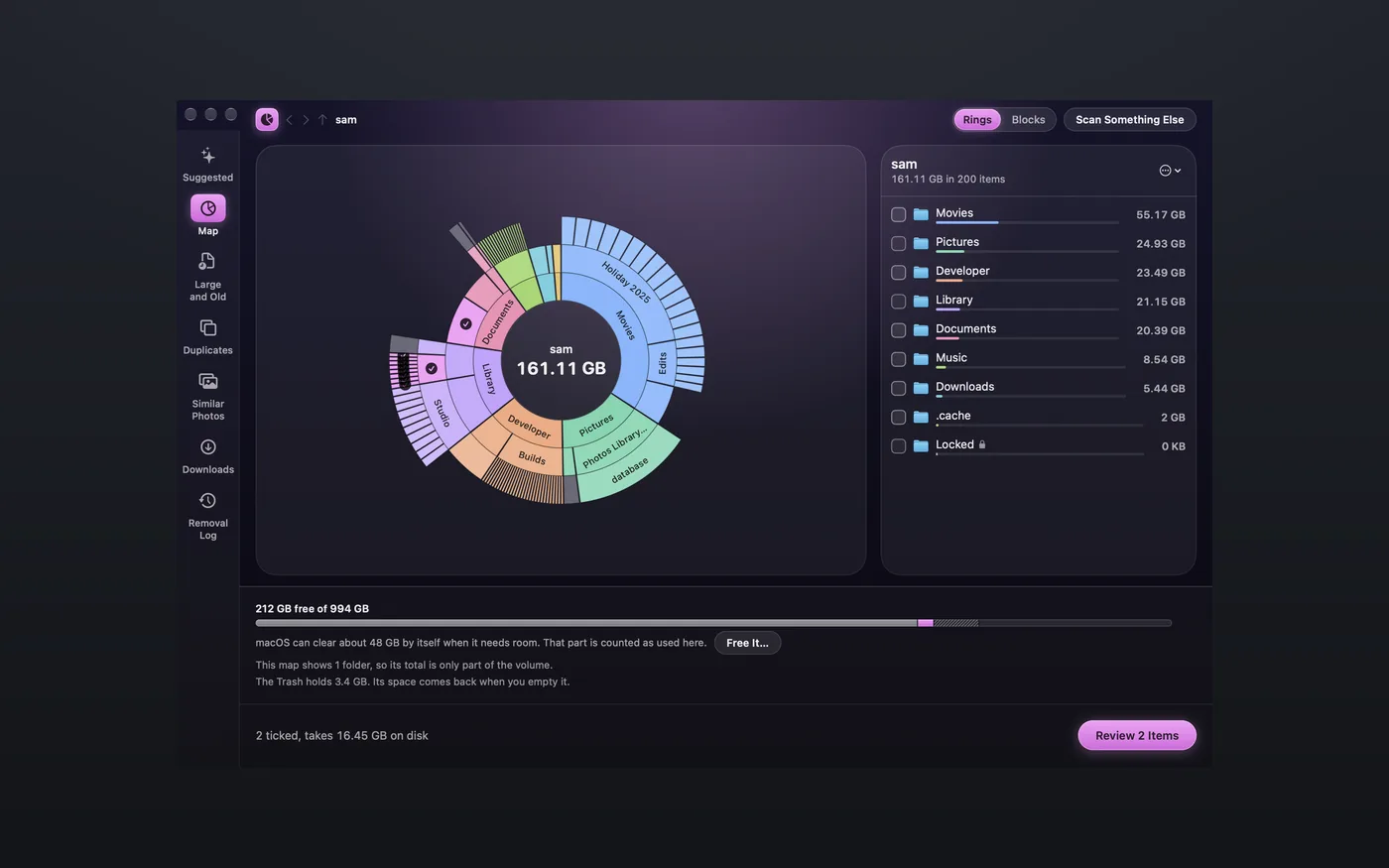
Space draws your disk as a map, with the largest items listed alongside it. Tick the things you no longer need, look over the list, and they go to the Trash.
You can try every feature free for 14 days, and no card is needed. After that it's $9.99 once, or you can get it in MixedBag along with the rest of the box for $49.99.

- You check the list first
- Everything goes to the Trash
- Scans stay on your Mac
- It needs Apple silicon and macOS 26

See where all the room went
Storage settings can only tell you about categories. Space shows you the folders themselves, drawn as rings or blocks, with the largest listed beside them. Click into any folder to see exactly what is inside it.

Start with what's worth a look
Space opens with a list of things worth a look, each with its size and the reason it is there. Only the items that a written rule proves safe start out ticked, such as an installer for an app you already have.

Find the files you forgot about
Large and old files are gathered in one list, and Downloads is sorted by age. Space also finds exact duplicates, always leaving one copy in place, as well as photos that look alike.

Nothing moves until you say so
Before anything happens, you see everything you ticked in a single list. It all goes to the Trash, where Put Back can return it, and anything that syncs with iCloud comes with a warning first.
There is more to Space
Sizes on disk
Each item shows the room it takes on disk, and a file with several names is counted only once.
A second look
Just before each move, Space checks the item again.
System folders stay
System folders can be opened and looked at, but they can never be ticked.
Saved scans
A folder you scanned before opens at once, marked with the age of that scan.
Apps go to Uninstall
Space leaves apps alone and points you to Uninstall for those.
A closer look at Space

$9.99, once
- You can try Space free for 14 days first, with every feature included and no card needed.
- Your purchase includes 1 year of updates.
- After that, $19.99 a year keeps the updates coming, and if you choose not to renew, Space keeps working as it is.
- One key works on up to 3 Macs.
- You can also get it in MixedBag, along with the rest of the box, for $49.99.
If it isn't right for you, email hello@aretebase.com within 14 days of buying and we'll give you your money back.
Before you install
Space asks only for what a scan needs. If you pick a single folder, it asks for nothing. If you scan your home folder, macOS checks with you about Desktop, Documents and Downloads, so that Space can read the names and sizes there. Full Disk Access is optional and only comes up when you choose the whole disk. If you look for similar photos in your Photos library, macOS asks about Photos.
You'll need a Mac with Apple silicon running macOS 26 or later.
Questions
Doesn't Storage in System Settings already do what Space does?
It does some of it. Storage names categories, and it can store files in iCloud or empty the Trash for you. Space shows you the folders themselves as a picture, so you can see where the room went. Read the guide to freeing up disk space on a Mac.
Why is Space's total different from Finder's?
The figures often differ. Space shows how much room macOS can clear by itself, and it explains why its map and the disk's used figure don't line up.
When do I get the disk space back from Space?
You get the space back when you empty the Trash.
Does Space need Full Disk Access?
It needs it only if you scan the whole disk. A folder you pick needs no permission, and a scan of your home folder brings up macOS's own prompts for Desktop, Documents and Downloads.
What does Space tick for me?
Space ticks only what a written rule proves safe, such as an installer for an app you already have. Everything else starts unticked, and nothing moves until you have seen the list.
If you still have a question, write to us at hello@aretebase.com.
Find out where your disk space went.
You can try every feature free for 14 days, and no card is needed. After that it's $9.99 once, or you can get it in MixedBag along with the rest of the box for $49.99.