
Keep your Mac's battery at 80%. Know when it slips.
A beautiful battery app made for your Mac. Amply runs the charge limit Apple built into macOS. It checks that the limit holds and tells you in plain words why your Mac is (or isn't) charging.
Version 1.1.4, 14.8 MB, macOS 26.4+
Free for 14 days (no card needed), then $9.50, once (50% off $19). Signed and notarized by Apple. Needs a Mac with Apple silicon and macOS 26.4 or later.
What Amply does.
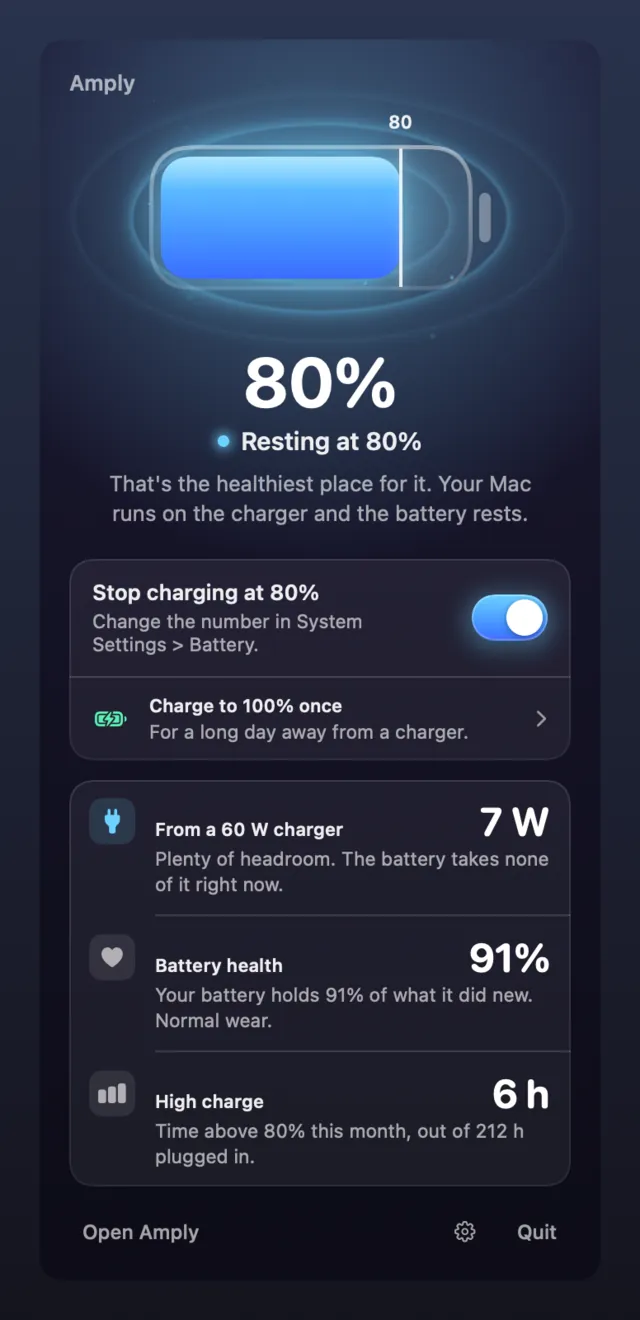
- Uses Apple's own limit
- macOS 26.4 added a charge limit to System Settings. Amply turns it on and off for you. There's no admin password, and it never writes to the chip that runs charging.
- Watches it
- If the battery charges past your limit, or someone turns the limit off, you get a notification.
- Says why
- Every state comes with a plain sentence. At the limit it reads "Your Mac runs on the charger and the battery rests." No codes to look up. If you want the watts and the mAh anyway, a switch in Settings turns every explanation Technical.
- Shows the payoff
- You see hours above 80% this month, battery health over time, and the watts your charger really delivers.
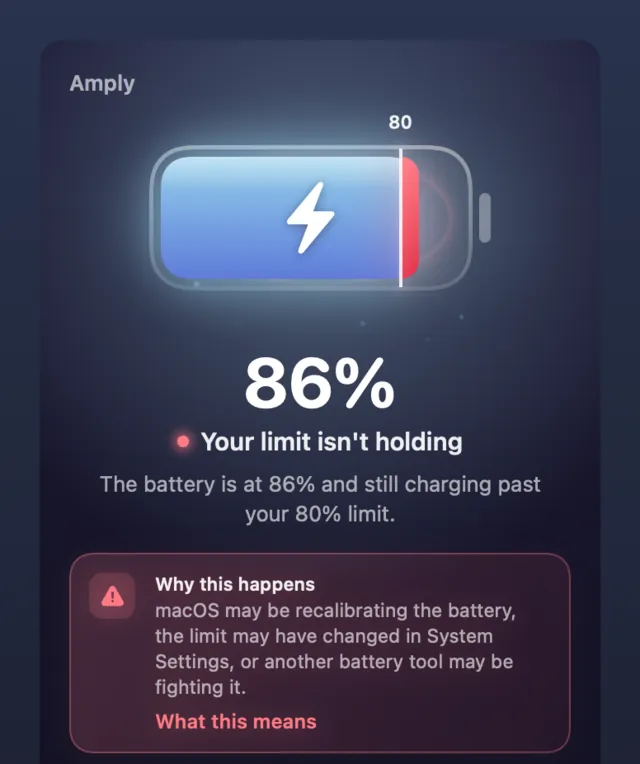
When the limit stops holding, you'll hear about it.
A charge limit can slip while nothing on screen changes. Amply notices the battery charging past your limit and sends a notification. Then it lists 3 possible causes, so you know where to look:
- macOS may be recalibrating the battery.
- The limit may have changed in System Settings.
- Another battery tool may be fighting it.
See what the care adds up to.
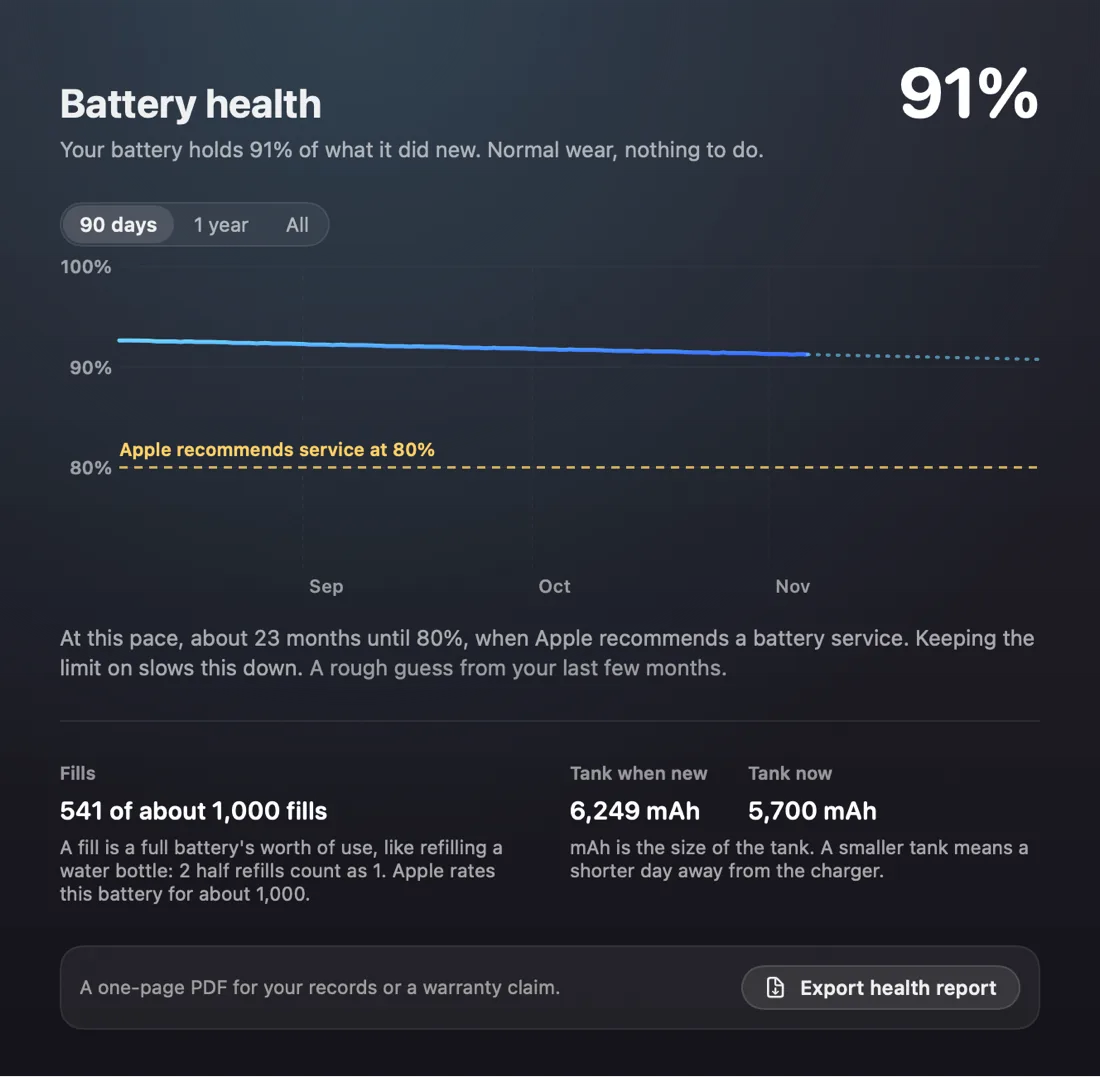
The Health tab tracks how much charge your battery holds compared with when it was new. Look back 90 days, a year or all the way to the day you installed Amply. Each view shows the 80% line where Apple recommends service.
The Export health report button saves it as a 1-page PDF. It's handy for your records or a warranty claim.
A few more things in Amply.
- An alert when the limit gets switched off, and another when the battery gets hot while plugged in.
- Charge to 100% once, for a long day away from a charger. Amply turns your limit back on afterwards.
- A live view of the power (what the charger sends, what the Mac uses and what goes into the battery).
- Energy use by app, so you can see what's draining the battery.
- A charger report card that tells you, in plain words, whether the charger you plugged in is enough for this Mac.
- Time left in words you can say out loud, such as enough for about a 3-hour meeting.
- A battery service card when health nears 80%, with Apple's US repair price for your Mac and a link to book it.
- In English, Spanish, German, French and Japanese.
What you need.
A Mac with Apple silicon on macOS 26.4 or later. We built and tested Amply on macOS 27. (Not sure which chip you have? Apple menu > About This Mac shows a Chip line on Apple silicon.)
On an Intel Mac or an older macOS, Amply can only watch the battery.
It isn't on the Mac App Store. Amply uses a part of macOS that Apple doesn't document, and the App Store doesn't allow that.
$9.50, once.
- That's 50% off $19.
- 14 days free with every feature. No card needed.
- 1 key works on up to 3 Macs. You'll find it on your purchase page and in Polar's customer portal.
- Updates to version 1 are free.
- Sold by Aretebase LLC through Polar (they handle payment and tax).
Not working for you? Write to hello@aretebase.com within 14 days of buying and we'll give you your money back.
Your battery data stays on your Mac.
Your battery readings, history and settings never leave your Mac. Amply goes online for 2 things only: the license check with Polar, and a daily look for updates on aretebase.com. There's no account and no analytics.
Questions
Why not just use the limit in System Settings?
You can, and Amply uses that same limit. On top of it, Amply tells you when the limit stops holding and why. It also keeps a record of battery health and turns the limit back on after a charge to 100%.
Is Amply like AlDente?
Both keep a MacBook below 100%. AlDente sets its own charge limit, and it also runs on Intel Macs and on macOS 12 and later. Amply uses the limit built into macOS 26.4 and tells you when it slips. Amply and AlDente, side by side
Can a macOS update break it?
It can. Amply relies on a part of macOS that Apple doesn't document. If an update stops the switch working, Amply says so and keeps watching the battery. Then we ship a fix as soon as we can.
Does Amply change my limit by itself?
No. It only changes the limit when you ask it to (the switch, a charge to 100%, or a setting you turn on).
Does it need an admin password?
No. Amply runs as a normal app and never asks for one.
What happens when the trial ends?
Amply still shows what your battery is doing. Alerts, history, charge to 100% and the report need a license.
Can I move my key to another Mac?
Yes. On the old Mac, open Settings > License and click "Deactivate this Mac". That frees the seat for the new one. A key covers 3 Macs at a time.
Have a question we didn't answer here? Please write to hello@aretebase.com. Privacy · Terms
