Fill, sign and fix PDFs on your Mac.
Fill in a form, sign it, correct a typo or rearrange the pages, all in one app. When you redact something, HandyPDF checks the saved file to make sure nothing is left behind.
You can try every feature free for 14 days, and no card is needed. After that, reading, finding and printing stay free, and the rest is $9.99 once, or comes in MixedBag along with the rest of the box for $49.99.

- Nothing is uploaded
- Your original stays in place
- Reading stays free
- It needs Apple silicon and macOS 26

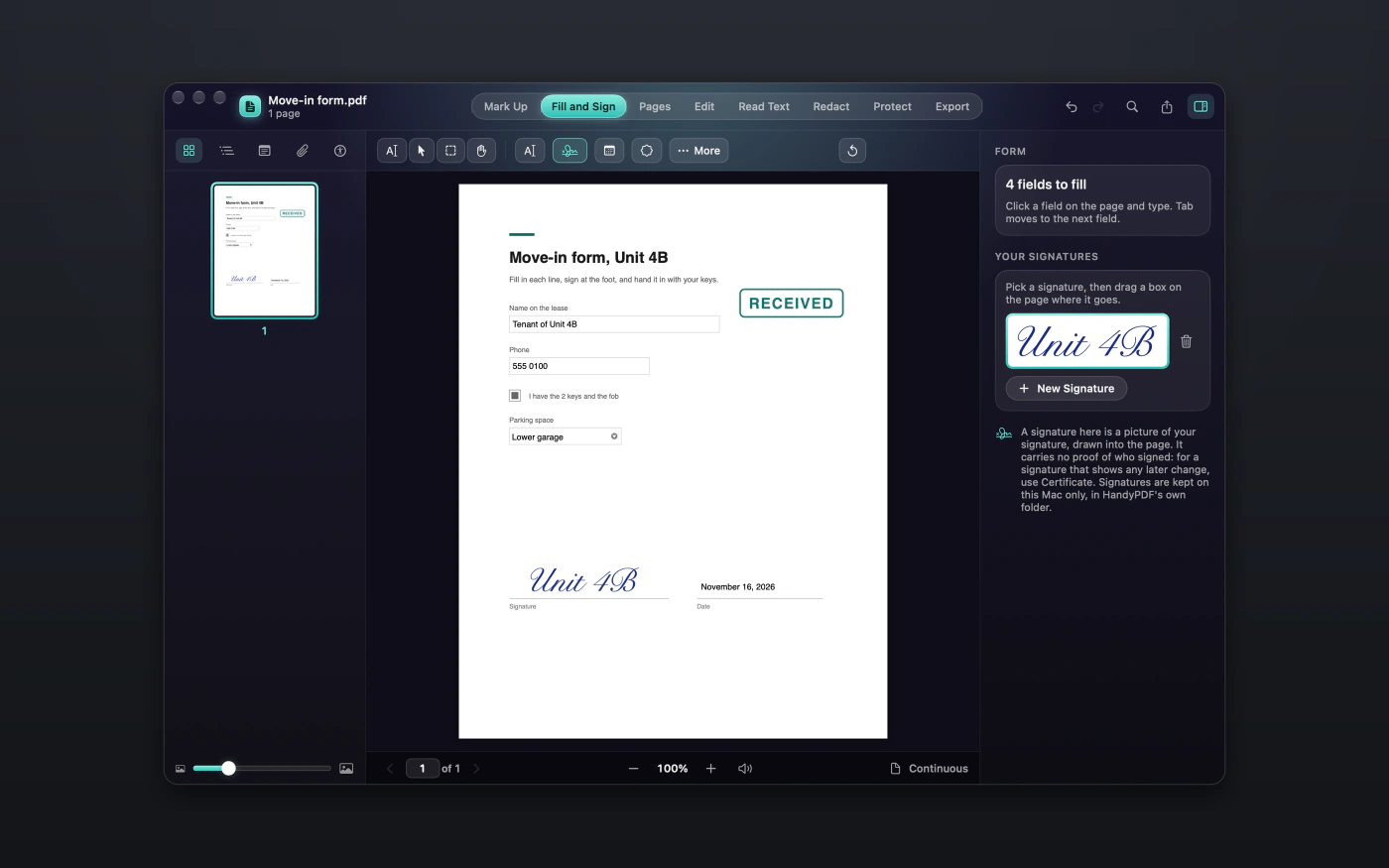
Fill in a form and sign it
When a form arrives as a PDF, you can type into its fields, tick the checkboxes and choose from the lists without printing a thing. Your signature goes on as a picture, which you can draw, type or take from a photo.

Change the words in your PDF, right on the page
Click the words on a page and change them right there, a paragraph at a time, and the new words wrap inside the paragraph's own box in the file's own font. If a page can't be edited, as with a scan, HandyPDF explains why and leaves it untouched.

Redaction that checks itself
A black box drawn over text can still leave the words underneath it. HandyPDF marks every match, saves those pages as pictures and then reads the file back. If even one match remains, it deletes the file and tells you.

Put the pages in order
You can reorder, delete, rotate, insert and crop pages, or pull a few out into a new file. Every step can be undone, so you are free to try an arrangement and change your mind.
There is more to HandyPDF
Search your scans
Read Text makes a scanned PDF searchable, so you can find and copy the words inside it.
Smaller files
Make Smaller shows you both sizes and keeps the new copy only if it really is smaller.
Lock a copy
You can put a password on a copy, so only the people who know it can open the file.
Mark it up
You can highlight and underline text, and add notes, shapes, arrows and text boxes.
Compare 2 versions
HandyPDF shows you what changed between 2 versions of a PDF, word by word.
Page numbers and watermarks
You can add page numbers, headers, footers or a watermark to every page or only to some.
A closer look at HandyPDF

$9.99, once
- You can try HandyPDF free for 14 days first, with every feature included and no card needed.
- Your purchase includes 1 year of updates.
- After that, $19.99 a year keeps the updates coming, and if you choose not to renew, HandyPDF keeps working as it is.
- One key works on up to 3 Macs.
- You can also get it in MixedBag, along with the rest of the box, for $49.99.
If it isn't right for you, email hello@aretebase.com within 14 days of buying and we'll give you your money back.
Before you install
HandyPDF asks for nothing up front. If you record a sound note, macOS asks about the microphone at that point.
You'll need a Mac with Apple silicon running macOS 26 or later.
Questions
Does a signature made in HandyPDF prove who signed?
No, because a drawn signature is a picture. If you need more than that, HandyPDF can also sign with a certificate, which shows whether the file was changed afterwards. Whether that is accepted is up to whoever asked you to sign.
Doesn't Preview already do what HandyPDF does?
Preview does a lot of it, and it is free on every Mac. HandyPDF adds find and redact with a check of the saved file, searchable scans, a Make Smaller tool that shows both sizes, and plain explanations of what each job does. Read the guide to editing a PDF on a Mac.
Does HandyPDF upload my PDFs?
No, everything happens on your Mac. The one exception is a web address you ask it to turn into a PDF, because it has to load that page.
Does cropping a page remove what's outside the box?
No, cropping only hides it. To remove something for good, redact it instead.
What still works after the HandyPDF trial?
Reading, finding and printing stay free. Everything else needs a key.
If you still have a question, write to us at hello@aretebase.com.
Open your next PDF in HandyPDF.
You can try every feature free for 14 days, and no card is needed. After that, reading, finding and printing stay free, and the rest is $9.99 once, or comes in MixedBag along with the rest of the box for $49.99.