Keep everything you copy within easy reach.
Clipboard remembers the text, links, images and colors you copy, and lets you search through all of it whenever you need something again. Your history stays on your Mac.
You can try every feature free for 14 days, and no card is needed. After that it's $9.99 once, or you can get it in MixedBag along with the rest of the box for $49.99.

- Your history stays on your Mac
- There is no account to create
- It works with no permissions
- It needs Apple silicon and macOS 26

Everything you copy, saved and easy to find
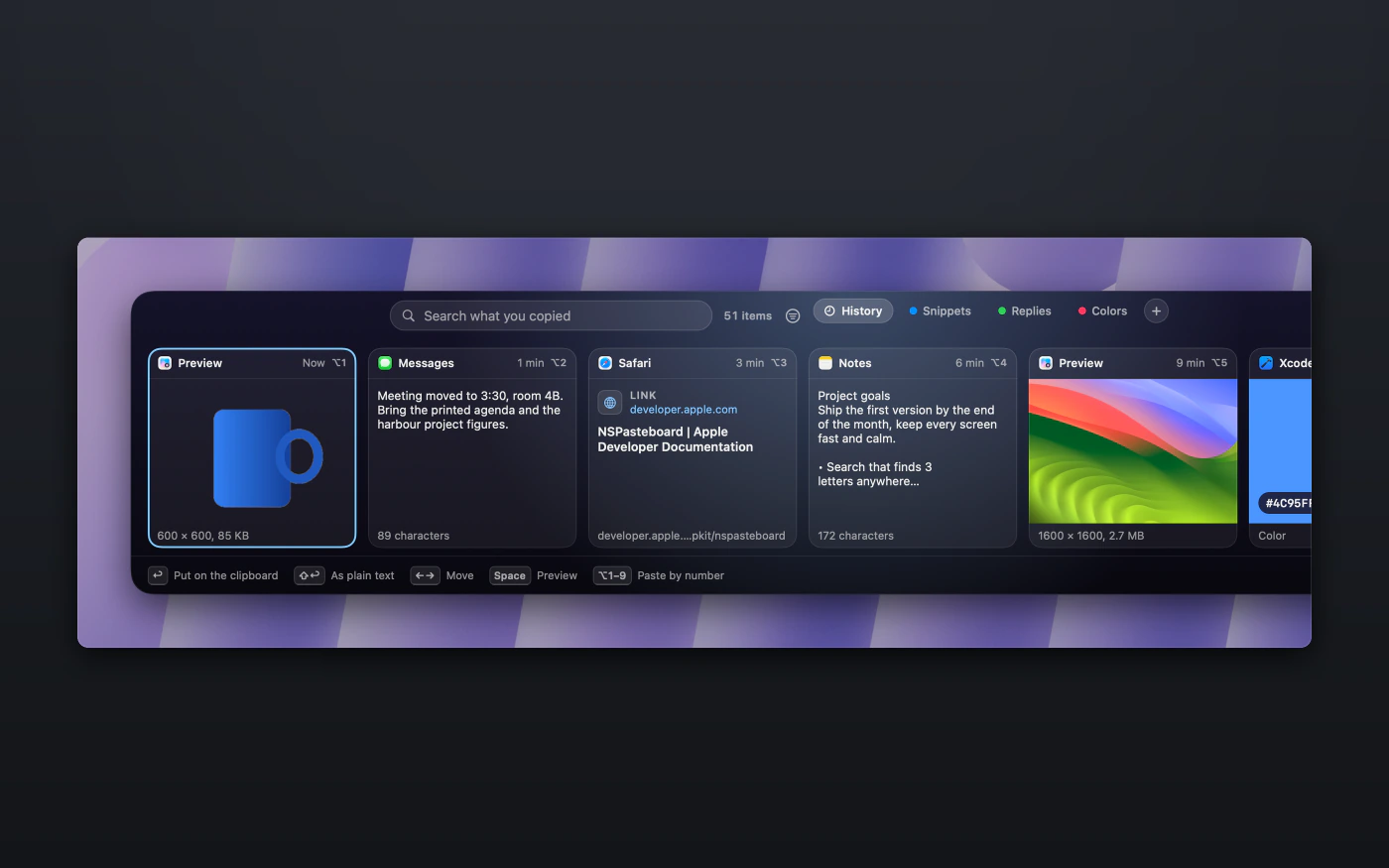
Clipboard quietly keeps a history of everything you copy on your Mac, including text, links, images and colors. When you need something you copied earlier in the day, or even last week, just open Clipboard, start typing and paste it right where you are working.

Keep as much or as little as you like
By default, Clipboard keeps everything until you decide to clear it. If you prefer a tidier history, you can choose to keep items for a set number of days or limit how much it stores.

Paste several things in the order you copied them
Copy several things in a row, and then paste them back one after another, from first to last. It saves you from switching back and forth between windows when you are filling in a form.

Keep the things you reuse on a board
Pin the things you paste every week, such as an address or a line of code, to a board with a name of your choosing. Pinned items stay put whatever your history settings are, and they remain even when you clear your history.
Your history is private from the start
Your history lives in one folder that only you can open, and it is left out of Time Machine. Clipboard's windows don't appear in screen sharing or screenshots unless you allow it.
When a password manager marks a copy as private, Clipboard skips it and never reads it. The ignore list starts with 9 password managers already on it, and you can pause Clipboard whenever you like. If an app copies a password without marking it, Clipboard treats it like any other copy, so it is worth adding that app to the list.
When you copy a link, Clipboard loads that page once, from your Mac, to show its title and picture. Doing so can use up a link that works only once, such as a sign-in link, so one switch in Settings turns this off.
There is more to Clipboard
Edit before you paste
You can edit text and links, copy a color as hex, rgb or hsl, and cut the background out of a picture or turn it before you paste.
Search in plain words
Type any 3 letters from inside a word, or describe what you want, such as "links today" or "from Mail". Clipboard finds the words inside pictures you copied as well.
A bigger look
Press Space for a larger preview, and zoom in on a picture to see its detail.
Paste by number
Open your history and press Option or Command with a number from 1 to 9 to paste that item.
Links without tracking tags
You can copy a link without its tracking tags, or copy it as Markdown.
Several at once
Select several items, and then paste, pin or delete them together.
A closer look at Clipboard


$9.99, once
- You can try Clipboard free for 14 days first, with every feature included and no card needed.
- Your purchase includes 1 year of updates.
- After that, $19.99 a year keeps the updates coming, and if you choose not to renew, Clipboard keeps working as it is.
- One key works on up to 3 Macs.
- You can also get it in MixedBag, along with the rest of the box, for $49.99.
If it isn't right for you, email hello@aretebase.com within 14 days of buying and we'll give you your money back.
Before you install
Clipboard works without any permissions. You pick an item, it goes onto the clipboard, and you press Command-V to paste. If you would like Return to paste straight into the app you were using, there is one optional permission for that (macOS 26 calls it Accessibility, and macOS 27 calls it Device Control and Data Access).
You'll need a Mac with Apple silicon running macOS 26 or later.
Questions
Spotlight can already search what I copied, so why would I need Clipboard?
macOS can search what you copied and clear it. Clipboard adds boards, a paste queue, rules for individual apps, history limits that you choose and the ability to edit an item before you paste it. Read the guide to clipboard history on a Mac.
Can I move my Clipboard history to another Mac?
Yes, although you do it by hand. Save your history and boards to a single file, with a passphrase if you like, and then load that file on the other Mac.
Does Clipboard keep my passwords?
It doesn't when a password manager marks the copy as private. Clipboard skips those copies and never reads them. If an app copies a password without marking it, Clipboard does keep it, so you should add that app to the ignore list.
Does Clipboard need a permission?
No, it doesn't. Pick an item and press Command-V. One optional permission lets Return paste straight into the app you were using.
Can I turn Clipboard off for a while?
Yes, you can pause it for 15 minutes, for 1 hour, until tomorrow, or until you turn it back on.
If you still have a question, write to us at hello@aretebase.com.
Try Clipboard and stop copying the same thing twice.
You can try every feature free for 14 days, and no card is needed. After that it's $9.99 once, or you can get it in MixedBag along with the rest of the box for $49.99.