Arrange your windows in halves, thirds and more with a single keystroke.
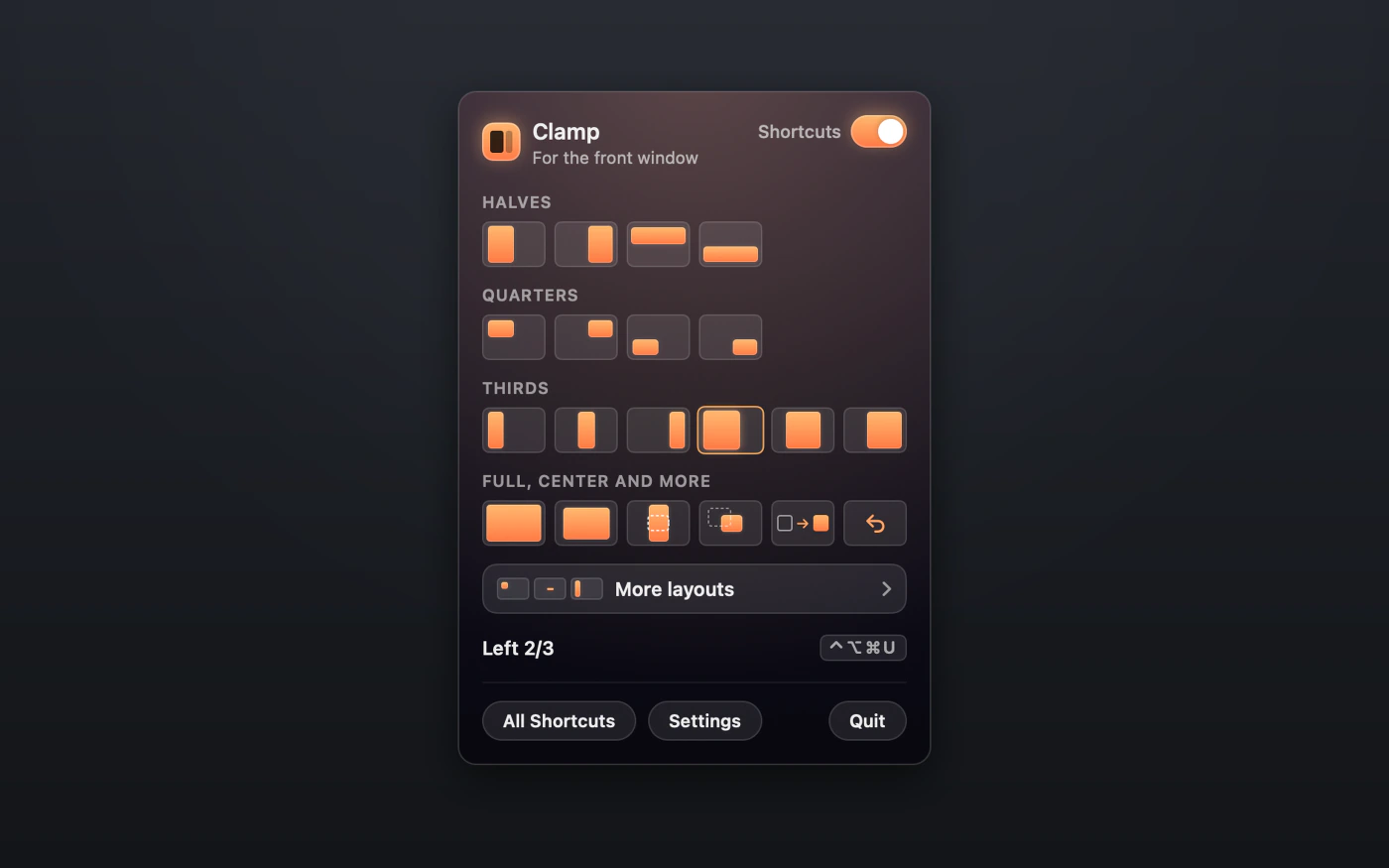
Press a shortcut and the window you're working in snaps neatly into place. If you'd rather not remember shortcuts, you can choose a layout from the menu bar instead.
You can try every feature free for 14 days, and no card is needed. After that it's $9.99 once, or you can get it in MixedBag along with the rest of the box for $49.99.

- It needs one permission, turned on once
- It reads nothing inside your windows
- It needs Apple silicon and macOS 26
- Refunds are given within 14 days

The sizes your Mac leaves out
Your Mac already arranges windows in halves and quarters. Clamp adds the sizes it leaves out, including thirds, 2/3 widths and almost full, along with grids as fine as sixteenths. Altogether there are 143 window actions to choose from.

There is nothing to memorize
Press one key and every shortcut appears over the app you're using, so you never have to learn them by heart. Click a layout, or search for it by name and press Return, and your window moves into place.

Choose a layout from the menu bar
If you prefer to point and click, the menu bar icon opens a picker with every layout, and hovering over one shows its name and keys. For finer sizes, pick a grid and click the cell you want.

Tidy a whole screen at once
When a display gets crowded, you can tile every window on it in one go, or only the windows of a single app. If the result isn't what you wanted, choosing Restore straight afterwards puts everything back.
There is more to Clamp
Make the keys yours
You can give any layout your own keys, and Settings warns you if another layout already uses them.
Undo a move
Restore returns a window to where it was before Clamp first moved it.
Room between windows
You can set a gap between windows and at each screen edge, anywhere from 0 to 40 points.
Windows that won't shrink
When an app refuses a size, Clamp still keeps its window on the side you asked for.
Why nothing moved
When a window can't be moved, a short note beside it explains why.
Games keep their keys
Add a game to the ignore list, and Clamp's shortcuts stay off while that game is in front.
A closer look at Clamp

$9.99, once
- You can try Clamp free for 14 days first, with every feature included and no card needed.
- Your purchase includes 1 year of updates.
- After that, $19.99 a year keeps the updates coming, and if you choose not to renew, Clamp keeps working as it is.
- One key works on up to 3 Macs.
- You can also get it in MixedBag, along with the rest of the box, for $49.99.
If it isn't right for you, email hello@aretebase.com within 14 days of buying and we'll give you your money back.
Before you install
Clamp needs one permission, which you turn on once in System Settings > Privacy & Security. It is how macOS lets an app move another app's window (macOS 26 calls it Accessibility, and macOS 27 calls it Device Control and Data Access). Clamp uses it to read and set a window's size and position, and it never reads what's inside a window.
You'll need a Mac with Apple silicon running macOS 26 or later.
Questions
macOS already snaps windows, so why would I need Clamp?
macOS handles halves and quarters. Clamp adds thirds, 2/3 and almost full, along with a picker in the menu bar and a sheet that shows every shortcut. Read the guide to splitting the screen on a Mac.
Why does Clamp need that permission?
That permission is how macOS lets an app move another app's window. Clamp uses it only for the size and position of the front window.
Why does a Clamp shortcut do nothing?
Another app may be using the same keys, and Clamp has no way to see that. Giving the layout different keys in Settings will fix it.
Can a game keep its keys with Clamp?
Yes, it can. Add the game to the ignore list, and Clamp's shortcuts stay off while it is in front.
Why didn't Clamp move my window?
A window in full screen, or one with a fixed size, can't be moved. Clamp shows a short note near the window that tells you which it is.
If you still have a question, write to us at hello@aretebase.com.
Put your next window exactly where you want it.
You can try every feature free for 14 days, and no card is needed. After that it's $9.99 once, or you can get it in MixedBag along with the rest of the box for $49.99.